Setup Strong 8K IPTV subscription in just 3 minutes
Choose your device and follow the simple steps shown.
Need Help? Chat with us
IBO Pro:
Install Downloader app from Play Store
Open it and enter code:
481220Install and open IBO Pro
Send us your MAC Address and Device Key to activate
TiviMate (Optional):
In Downloader, enter code:
272483Install and open TiviMate
After subscription, we send you your login info
IBO Pro:
Go to your TV’s App Store
Search and install IBO Pro Player
Open the app
Send us the MAC Address and Device Key shown on the screen
🔐 We’ll activate your subscription and send everything you need to get started.
IBO Pro:
Go to your TV’s App Store
Search and install IBO Pro Player
Open the app
Send us the MAC Address and Device Key shown on the screen
🔐 We’ll activate your subscription and send everything you need to get started.
There are several applications you can install on your Android smartphone to enjoy your subscription. You can use one of the applications listed below. All of these applications are free.
- Lxtream
- IPTV Smarters Pro
SET IPTV (€15 for lifetime)
SMART IPTV (€5 for lifetime)
✅ Steps:
Send us your MAC Address (found on the bottom of your MAG box or in Settings)
We’ll activate it and link it to our IPTV server
Reboot the device and the channels will load automatically
💡 No need to install any app – just plug in and enjoy once we activate your box
IBO Pro:
Install Downloader app from Play Store
Open it and enter code:
481220Install and open IBO Pro
Send us your MAC Address and Device Key to activate
TiviMate (Optional):
In Downloader, enter code:
272483Install and open TiviMate
After subscription, we send you your login info
IBO Pro:
Go to your TV’s App Store
Search and install IBO Pro Player
Open the app
Send us the MAC Address and Device Key shown on the screen
🔐 We’ll activate your subscription and send everything you need to get started.
IBO Pro:
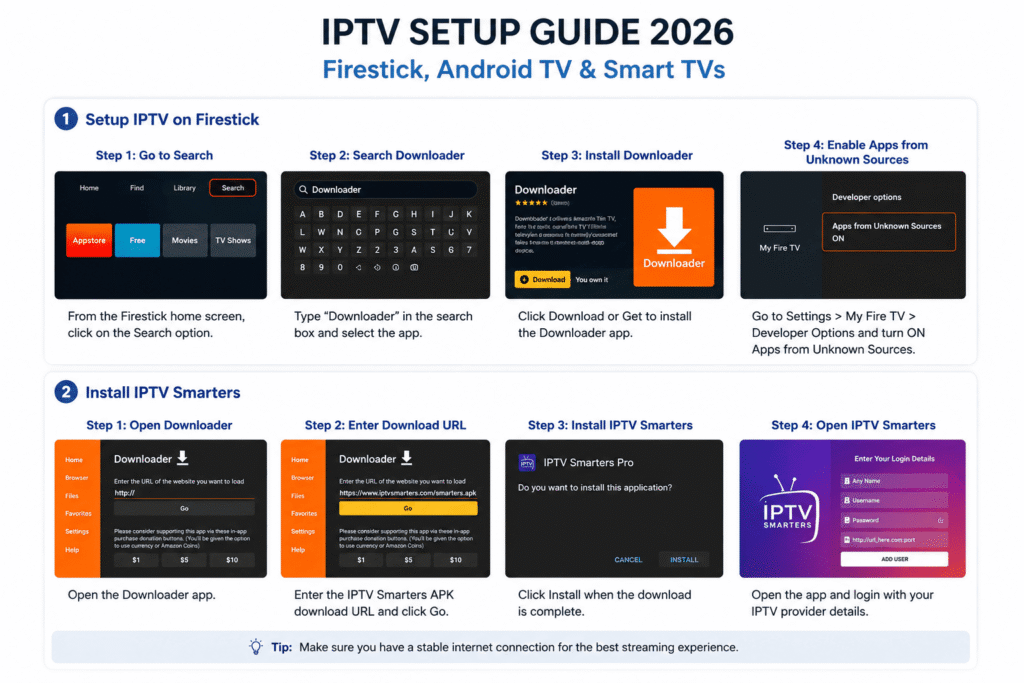
Go to: Settings > My Fire TV > Developer Options
Enable Apps from Unknown Sources
Open Downloader app
Enter code:
481220Install and launch IBO Pro
Send us your MAC Address and Device Key to activate
TiviMate (Optional):
Open Downloader again
Enter code:
272483Install and open TiviMate
We’ll send you the login details after subscription
🖥️ How to Setup Strong 8K IPTV – Full Guide
Setting up Strong 8K IPTV is fast and simple. Whether you’re using a Smart TV, Android device, Firestick, or PC, you can enjoy ultra HD streaming in just a few steps. Follow this guide to activate your subscription and start watching thousands of channels with Strong IPTV in under 5 minutes.
🔧 Step-by-Step to Setup Strong 8K
1. Choose your subscription
Start by selecting the plan that suits you: 1, 3, 6, or 12 months. Once your payment is confirmed, your access will be activated.
2. Install a compatible player
To use Strong 8K IPTV, you’ll need a compatible app or player. We recommend:
IBO Player
Smart IPTV (SIPTV)
Net IPTV
XCIPTV
Tivimate (Android)
3. Upload your playlist
After installing your player, enter the credentials or playlist link provided after your purchase. You’ll receive either an m3u link or Xtream Codes (username, password, server URL).
4. Activate your service
Once you enter your login or playlist details, restart the app. Your channels, VOD, and TV guide (EPG) will appear automatically.
5. Enjoy ultra HD & 8K content
Now you’re ready to stream over 36,000 live channels and thousands of movies & series with Strong IPTV — all in 8K quality.